Onboarding & KYC
Which settings can be used to configure an onboarding/KYC workflow?
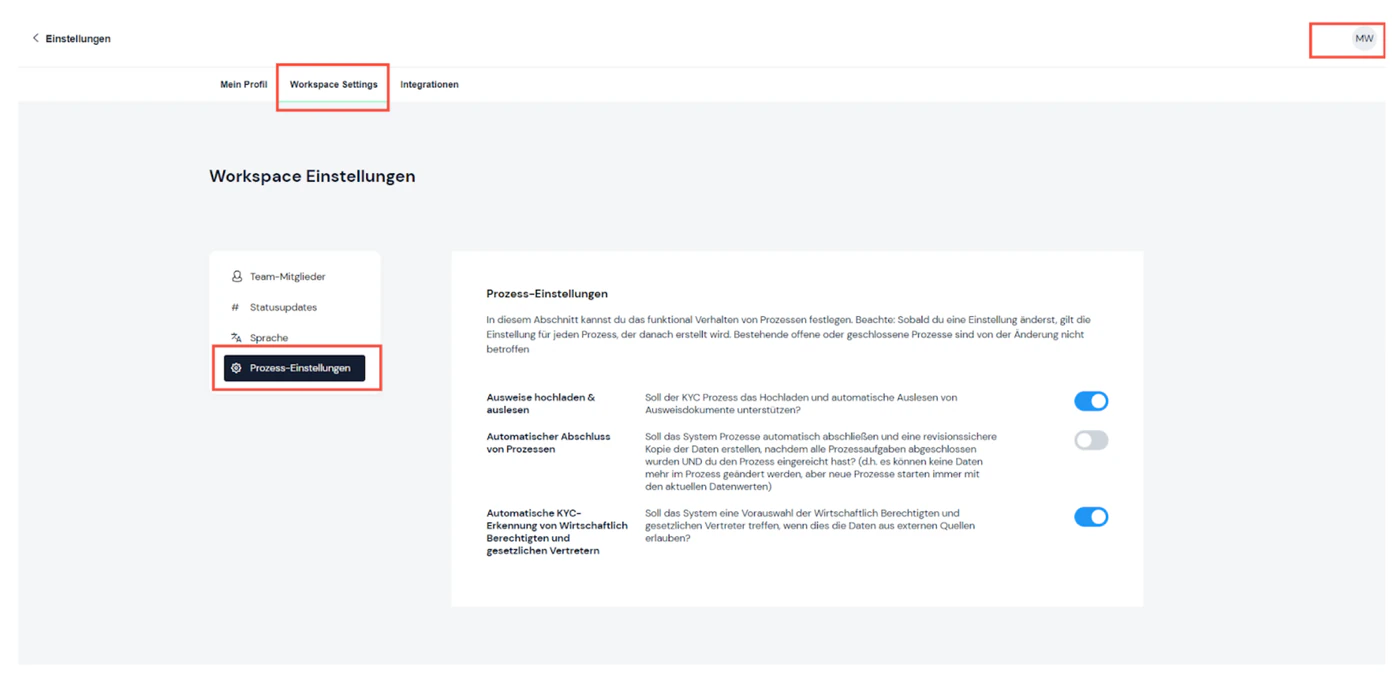
If you are the workspace owner of the system for your company, you can configure several settings for the onboarding / KYC workflow under PROFILE -> WORKSPACE SETTINGS -> PROCESS SETTINGS (see figure):
Note: As soon as you change a setting, it applies to every process created after that point. Existing open or closed processes are not affected by the change.
The following settings are available:
- Automatic KYC detection of beneficial owners and legal representatives: Should the system pre-select the beneficial owners and legal representatives when data from external sources allows it?
- Upload & read ID documents: Should the KYC process support uploading and automatically reading ID documents?
- Automatic completion of processes: Should the system automatically complete processes and create an audit-proof copy of the data once all process tasks are completed AND you have submitted the process? (i.e. data in the process can no longer be changed, but new processes always start with the current data values)

Still have questions?
Contact us or book a 30-minute demo call directly with our founder Eckhard Ortwein.